Skip Navigation or Skip to Content
Search icon
Light mode icon
Dark mode icon

Run a free HubSpot audit with Claude or ChatGPT

52 essential checks, 8 areas each scored out of 100, and a 30/60/90-day plan.

The AI skill our HubSpot team uses every day, now free. Install it in Claude or ChatGPT, connect your portal and get a HubSpot portal audit you can act on. A HubSpot audit checklist says where to look. This checks your portal and tells you what to fix first.

A comprehensive HubSpot audit, minus the service fee. No form, no email, no sales call.

FREE AI SKILL

A HubSpot portal audit across 8 areas

Think of it as a HubSpot health check you can run whenever you need one. The skill works through 52 essential checks, drawn from the 301-check catalogue our consultants audit against. Each area is scored out of 100, so you can see quickly where your portal is in good shape and where it's at risk.

  • Outside-in: email authentication, tracking, cookies and public files
  • Foundations and access: Hubs, seats, users and security
  • Privacy and compliance: GDPR features, consent and cookie banners
  • Data foundation: duplicates, fill rates, ownership and pipelines
  • Automation, integrations and AI: workflows, apps and AI settings
  • Go-to-market engines: forms, email health, sales tools and SLAs
  • Performance and adoption: speed to lead, conversion and win rate
  • Governance and resilience: admin ownership, deprecations and backup

Download and install

Download the skill (.zip)

Free. Version 1.0.0, 24 KB. No form, no email.

How to install

Claude

  1. In Claude (web or desktop), go to Settings > Capabilities and turn on Code execution and file creation.
  2. Go to Customize > Skills, click +, then Create skill > Upload a skill, and choose hubspot-portal-audit-light.zip.
  3. Recommended: go to Customize > Connectors, connect HubSpot and switch it on in your chat. Without it, the skill guides you with questions and screenshots instead.
  4. Type "Run a HubSpot portal audit".

On Team and Enterprise plans an Owner may need to enable skills and the HubSpot connector first.

Claude Code

  1. Unzip so the folder sits at ~/.claude/skills/hubspot-portal-audit-light/ (all projects) or .claude/skills/hubspot-portal-audit-light/ (one project).
  2. Optional: sign in with your claude.ai account to use the HubSpot connector you set up there, and check it with /mcp.
  3. Type "Run a HubSpot portal audit".

ChatGPT

  1. Unzip the download and create a new project in ChatGPT.
  2. Paste the contents of chatgpt/instructions.md into the project instructions.
  3. Upload references/checklist.md, references/report-template.md and assets/checklist.csv as project files.
  4. Optional: connect the HubSpot app under Settings > Apps.
  5. In a chat inside the project, type "Run a HubSpot portal audit".

Codex

  1. Unzip the download so you have a folder called hubspot-portal-audit-light with SKILL.md directly inside it.
  2. Move that folder into ~/.agents/skills/ for all your projects, or into .agents/skills/ at the root of a repo to use it only there. Older Codex versions read ~/.codex/skills/, which still works.
  3. Start a new Codex session, then type $hubspot-portal-audit-light or run /skills and select it.

Read-only: it never changes anything in HubSpot. Free under the CC BY 4.0 licence. A configuration review, not legal or compliance advice. HubSpot is a trademark of HubSpot, Inc. This skill is independent and not endorsed by HubSpot.

Want the full 301-check audit?

Our HubSpot audit services go much deeper: all 301 checks, every Hub in depth, a financial-services overlay, licence-waste analysis and an implementation roadmap.

Trusted by financial services and fintech teams on HubSpot

  • MoneyCorp
  • Monavate
  • YouLend
  • Yaspa
  • Iwoca
  • Yonder
  • Caxton
  • AAB
  • MoneyCorp
  • Monavate
  • YouLend
  • Yaspa
  • Iwoca
  • Yonder
  • Caxton
  • AAB

HOW WE WORK WITH AI

Built for our own work, shared with yours

AI is part of how Evara works every day. We use it the way financial services firms need it used: securely, compliantly and with people accountable for what it produces. This skill is one of the tools we rely on, and we're sharing it.

  • AI in our daily work

    Our team uses AI across delivery every day. It's part of how we research, build and review HubSpot work, not a side project.

  • Compliant from the start

    Our clients are regulated, so we use AI the way they have to: clear rules on what data goes where, and people checking the output.

  • Frontier and local models

    We use commercial frontier AI alongside locally run models, and choose for each job based on the security the work needs.

  • A tool we use ourselves

    This is the light edition of the audit our consultants run. We didn't build it for a landing page. We packaged it so you can run it too.

HOW IT WORKS

How to connect Claude to HubSpot and run the audit

  1. Install the skill

    Download the zip and add it to Claude, Claude Code or ChatGPT. The install panel walks you through it.

  2. Choose how it sees your portal

    Connect HubSpot so it reads settings and counts itself, or answer its questions and share screenshots instead.

  3. Run the audit

    Type "Run a HubSpot portal audit". It checks what's public first, then works through each area in turn.

  4. Get your score and plan

    Each area is scored out of 100, with your top actions and a 30/60/90-day plan to work through.

Sample HubSpot portal audit report with an overall score and a scorecard for 8 areas

WHAT YOU GET BACK

More than a HubSpot audit checklist: a report to act on

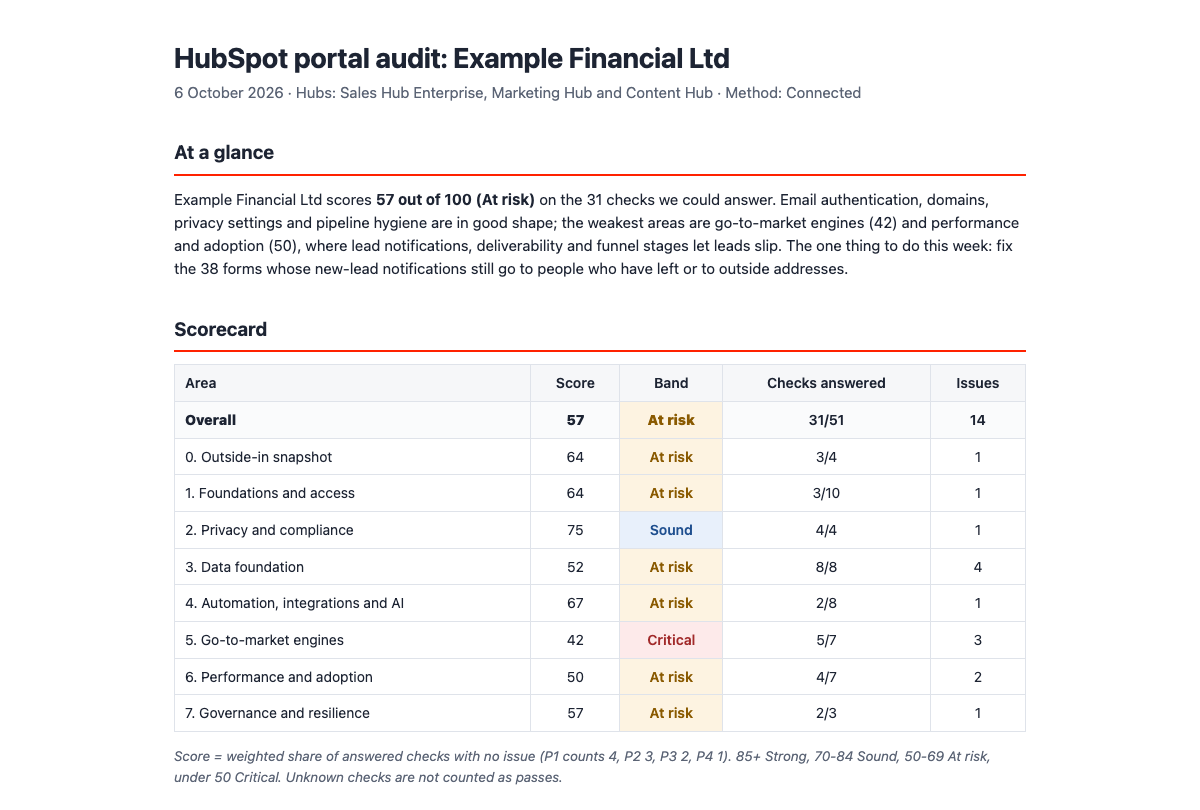
Every audit ends in the same clear report. It opens with your overall score and the one thing to do this week, tied to the goals you named at the start. A scorecard then rates each of the 8 areas out of 100 as Strong, Sound, At risk or Critical.

Next come up to 10 top actions, each with what was found, why it matters and a first step. A 30/60/90-day plan shows who usually owns each one. You also get the 52 checks as a spreadsheet, so you can track progress.

Want the full 301-check audit?

Our HubSpot audit services go much deeper: all 301 checks, every Hub in depth, a financial-services overlay, licence-waste analysis and an implementation roadmap.

FREQUENTLY ASKED QUESTIONS

Questions about the HubSpot audit and Claude HubSpot skills

A HubSpot audit is a structured review of how your portal is set up and used. It isn't HubSpot's audit log, which records who changed what. An AI skill is a packaged set of instructions, sometimes with reference files, that teaches an assistant like Claude or ChatGPT to do one job well. They know a lot, but not your process. A skill gives them one, so every run uses the same 52 checks and the same scoring.

Install the skill once in your AI tool. After that, the assistant loads it whenever your request matches what it does, or you can ask for it by name. Type "Run a HubSpot portal audit" to start. Skills work alongside connectors. The connector gives the AI access to a system such as HubSpot, and the skill tells it what to do there.

Skills use an open format supported by both Anthropic and OpenAI. You can use this one in Claude (Claude.ai, the Claude desktop app and Claude Code) and in ChatGPT, by adding it to a Project. Pair it with the ChatGPT HubSpot app to read your portal directly. It also works in Codex and other tools that support skills.

Claude integrates with HubSpot through a connector. To connect Claude to HubSpot, go to Customize, then Connectors, choose HubSpot and sign in with your HubSpot account. On Team and Enterprise plans, an Owner may need to enable it first. ChatGPT works the same way through its HubSpot app. You don't have to connect at all. Without a connector, the skill guides you with short questions and screenshots of settings pages.

The audit is read-only and never changes anything in HubSpot. It works from counts and settings, not contact records, keeps personal data out of the report and never asks for passwords or API keys. It runs in your own Claude or ChatGPT account, under that tool's terms. Evara doesn't receive your portal data or your results. For the wider picture, read our guide to data governance for fintech growth teams.

A HubSpot audit checklist tells you what to look at, and a HubSpot audit template gives you somewhere to record it. This skill does the looking, scores what it finds and tells you what to fix first, so you start from what's actually in your portal. If you want help with the fixes, our HubSpot services team works with financial services and fintech firms.

Still have questions about AI skills or your HubSpot portal? Talk to our team.

RELATED SERVICES

When the audit turns up more than a quick fix

  • HubSpot services for financial services

    Implementation, migration, onboarding, consulting and custom development for regulated firms. For when you want a partner to make HubSpot work, not just point out what's wrong.

  • Technology and CRM architecture

    If the audit points to deeper problems with how your CRM, data and integrations fit together, we design the architecture before anyone rebuilds anything.

  • Platform migration and integration

    Moving onto HubSpot, or connecting it to the rest of your stack. Clean data, careful cutovers and integrations that still work after go-live.