
.svg)
.svg)


WEBSITE DESIGN

Mihai Jepan
04 Jun 2025

Why JavaScript-heavy fintech sites are quietly invisible to ChatGPT, Claude and Perplexity, and what to do about it.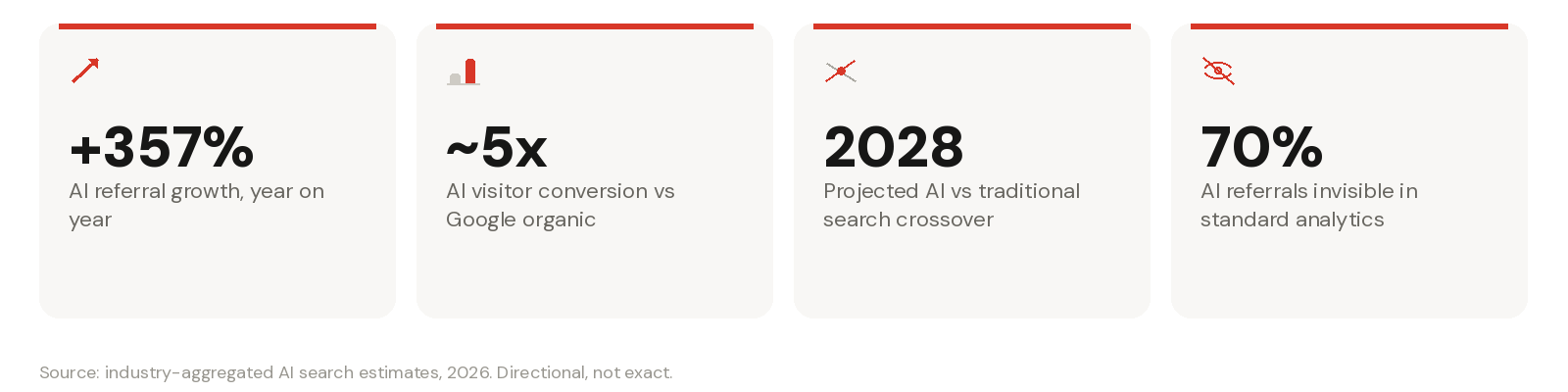
An estimated 70% of AI referral traffic never shows up in standard analytics. For a lot of fintech sites the real number is worse: 100% of it never arrives at all, because the AI systems that would send it can't read a page built in JavaScript.
This isn't a deliberate block. Nobody sets out to hide their pricing page or their compliance FAQ from ChatGPT. But a site built largely in JavaScript, where the server sends an empty shell and the browser fills in the content afterwards, can look identical to a blank page to the systems that increasingly decide whether your brand gets mentioned at all. The irony is that the more modern the build, the more likely this is to happen.
AI-led discovery is still a minority channel, but the trend lines are steep enough to matter now, not in three years. Industry-aggregated estimates for 2026 put growth in AI referral visits at over 350% year on year, with visitors arriving via AI assistants converting at close to five times the rate of standard Google organic traffic. Some projections put a crossover between AI-led and traditional search discovery around 2028. Whatever the exact date, the direction is not really in dispute.
The harder number is this: a large share of AI referral traffic, estimated at around 70%, doesn't show up cleanly in standard analytics at all. Most FSI and fintech marketing teams are flying without an instrument panel here. You can't fix a problem you can't see, and you can't see AI referral performance if the underlying issue is that AI systems couldn't read your site in the first place.
Every website sends two things to a visitor: raw HTML, and (usually) a JavaScript file that runs in the browser and fills in the rest. For a human, this is invisible. Your browser downloads the script, runs it, and you see the finished page a moment later.
For a growing number of AI systems, that second step never happens. They request the page, read the raw HTML that comes back, and stop. If your headline, your product description, your pricing table or your FAQ content only appears after a script runs, an AI system that doesn't execute JavaScript sees none of it: just an empty container and a reference to a script it never runs.
This is different from a technical SEO problem in the traditional sense. Your site can rank perfectly well in Google, load fast, and pass every Core Web Vitals check, while being functionally blank to the AI systems your buyers are increasingly using instead of a search box.
Google has spent well over a decade building a rendering pipeline (the Web Rendering Service) that executes JavaScript at scale before indexing a page. Because Google AI Overviews and AI Mode sit on top of that same infrastructure, they inherit the rendering capability. Bing's Copilot integration works the same way. Neither is the problem here.
The AI-native assistants are a different story. When Vercel first investigated this in December 2024, it found that ChatGPT, Perplexity and Anthropic's systems were not rendering client-side JavaScript. That finding has been independently reconfirmed multiple times since, most recently by SEO analyst Glenn Gabe, who ran his own case study on a fully client-side rendered site (a site that goes blank if you turn JavaScript off). Search Engine Journal's own breakdown of the topic makes a related point worth keeping in mind: there's no single governing standard across "LLM bots," and Claude's crawler doesn't necessarily behave the same way as OpenAI's, so the safest assumption is to build for the least capable bot, not the best-funded one.
A separate breakdown of individual crawler user agents tells the same story from a different angle: Googlebot and Apple's crawler render JavaScript in full; GPTBot, ChatGPT-User, OAI-SearchBot, ClaudeBot, PerplexityBot, Meta-ExternalAgent, Bytespider and CommonCrawl's CCBot do not. Interestingly, research from Vercel and Merj found that ChatGPT's crawler does request JavaScript files on around 11.5% of fetches, and Claude's on nearly 24%, but this is understood to be for training-data collection, reading the script as plain text, not for executing it and building a rendered page.
Gabe's case study surfaced two practical symptoms worth checking for on your own site. First, favicons: when a site's icon is injected via JavaScript rather than sitting in the raw HTML, ChatGPT and Perplexity fall back to a generic placeholder icon next to your brand name, even though the same favicon displays correctly in Google and Bing. Second, and more commercially important, citation placement: pages from the JavaScript-heavy site kept turning up in ChatGPT's "More" section or Perplexity's "Reviewed" section rather than in the primary Citations or Selected sections, usually with just a page title and no snippet. That's the visible fingerprint of a crawler that found the URL but extracted nothing worth quoting from it.
Direct testing confirmed the mechanism. Asked to summarise specific URLs from the client-side rendered site, ChatGPT, Perplexity and Claude each explicitly reported that they couldn't read the page because it relied on JavaScript rendering. The same prompts against non-JavaScript control pages returned accurate summaries and specific quoted paragraphs without issue.
|
Crawler |
What it is |
Renders JavaScript? |
|
Googlebot |
Google Search, AI Overviews, AI Mode |
✅ Yes |
|
Applebot |
Apple Intelligence, Siri |
✅ Yes |
|
GPTBot |
OpenAI's training and indexing crawler |
❌ No |
|
ChatGPT-User |
OpenAI's live browsing crawler |
❌ No |
|
OAI-SearchBot |
OpenAI's search crawler |
❌ No |
|
ClaudeBot |
Anthropic's crawler |
❌ No |
|
PerplexityBot |
Perplexity's crawler |
❌ No |
|
Meta-ExternalAgent |
Meta AI's crawler |
❌ No |
|
Bytespider |
ByteDance and TikTok's crawler |
❌ No |
|
CCBot |
Common Crawl, used to train many LLMs |
❌ No |
A more recent, more rigorous test pushed this further. Twelve AI assistants were each given a unique, unguessable URL. The page's raw HTML contained a fake reference number; a separate script, when executed, replaced it with the real one, and the real value existed nowhere except behind that executed code. Server logs recorded, in real time, whether each assistant's infrastructure ever ran the script.
The result was a clean geographic split. ChatGPT, Claude, Gemini, Perplexity, Meta AI and Microsoft Copilot all reported the fake decoy value: none of them executed the JavaScript. DeepSeek, ERNIE, Qwen, Kimi and Mistral reported the real value: they did.
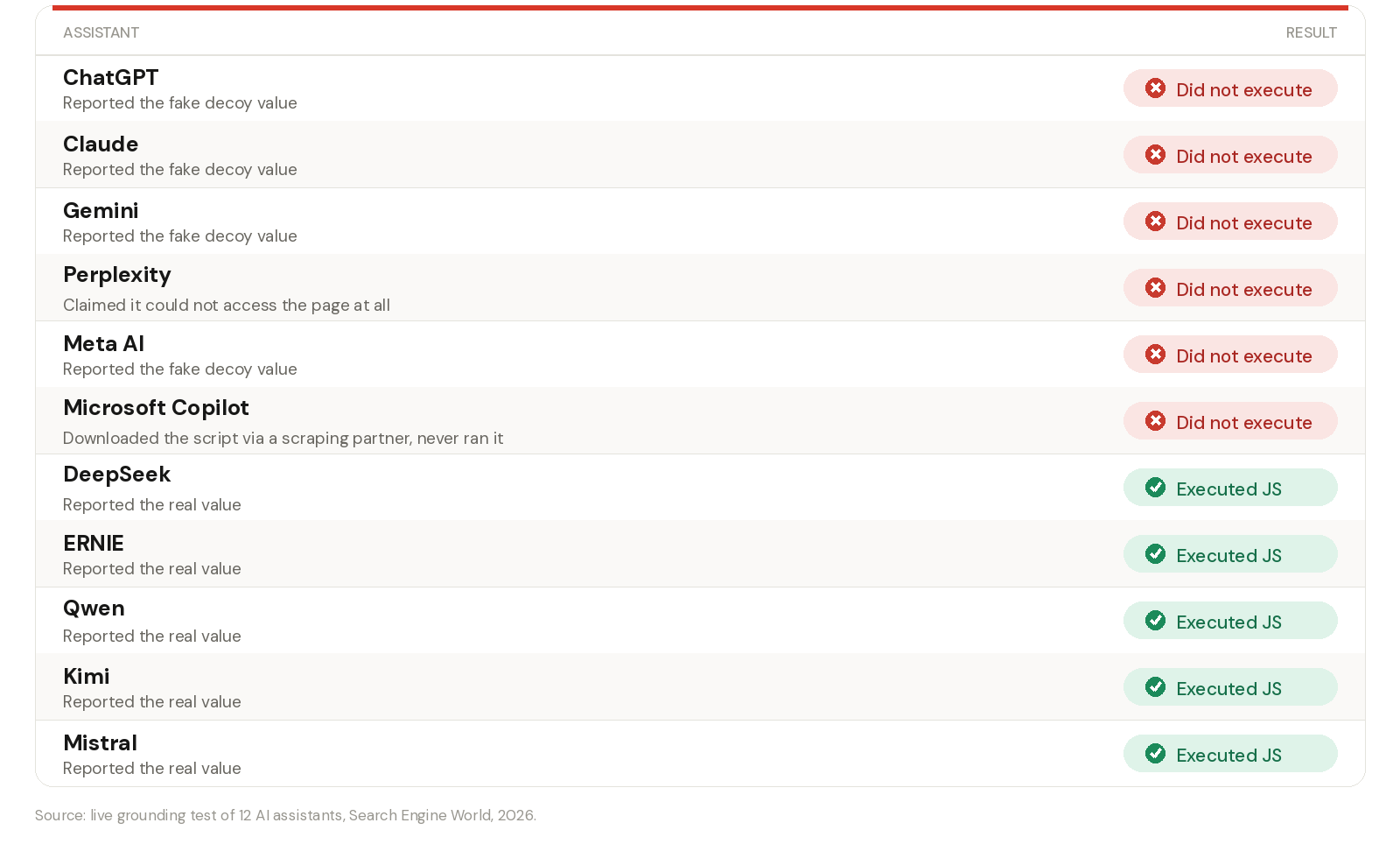
Two details from that test are worth remembering. Microsoft Copilot did download the external JavaScript file (via a third-party scraping partner) but never ran it, so the fetch happened without the content ever being extracted. And Perplexity's chat response claimed it "couldn't access" one of the test pages, while its own server logs showed its crawler had already fetched that exact page and received a normal, successful response. The chatbot's own account of what it did and what its infrastructure actually did were not the same thing. If you're testing your own site by simply asking the AI what it saw, treat the answer as a starting point, not proof.
It's worth being precise about scope here: this test measured the live, user-triggered "I've pasted a link, summarise it" pathway, which is a different question to how background crawlers like GPTBot or ClaudeBot behave when building their broader indexes or training sets. Both pathways matter, and the evidence so far suggests both are affected, but they're not identical.
There's a version of this problem that's specific to how fintech and FSI sites are usually built: schema markup. Many teams inject JSON-LD structured data (FAQ schema, product schema, organisation schema) via JavaScript after the page loads, because it's the easy way to bolt it onto an existing front end. As one detailed technical breakdown of the issue puts it, if that markup only exists after a script runs, it's invisible to any AI system that doesn't execute JavaScript, in exactly the same way the visible page content is. You can have technically correct schema sitting in your DOM in Chrome DevTools and it can still not exist from an AI crawler's point of view.
Here's the distinction that matters most for a fintech brand weighing how urgent this is. AI systems can still know about you even if they've never successfully read your own site: they pick up mentions of your brand from review sites, news coverage, forums, comparison articles, and other third-party sources that are more accessible. So it's entirely possible to be cited by ChatGPT while your own website has contributed nothing to that citation.
That should be uncomfortable, not reassuring. It means the AI's answer about your product, your pricing, your compliance position, or your differentiation is being assembled from whatever secondary sources happen to be readable, rather than from the page you built, tested, legalled and control. For a regulated business, that's a narrative you don't want to hand over by default. And it forecloses the upside entirely: no deep crawl, no direct citation of your own authoritative pages, and no route into whatever future training or retrieval systems eventually draw on today's crawl data.
You don't need to wait for an agency to tell you whether this affects you. A handful of checks will tell you most of what you need to know.
Not every fix here is the same size. Structured data that's injected via JavaScript can often be moved into the initial HTML response relatively quickly. Content locked behind tabs or accordions that load on click can, in many cases, be restructured to use native HTML elements that keep the content present in the DOM by default while still looking and behaving exactly the same for users. Favicon references and key on-page facts can usually be pulled forward into server-rendered markup without a rebuild.
A fully client-side rendered site, where the entire page is an empty shell until a script runs, is a bigger job: that typically means server-side rendering, static generation, or a hybrid approach, and depending on the framework and how deeply the JavaScript dependency runs, that can mean real development work rather than a quick patch. The right response is to find out which category you're in before assuming either the best or the worst.
This is exactly the gap our AI Search Unblocker engagement is built to close. It's a fixed-scope, three-month sprint, audit, implement, roadmap, that starts with a full technical SEO and crawl audit, a structured data audit, and an AI and AEO opportunity audit, so you know precisely where your site sits before anything gets changed. From there we fix the highest-impact issues: crawl and indexation, JSON-LD implementation, cannibalisation, internal linking, and a content refresh where it's needed, and finish by structuring content for AI retrieval and handing over an AI citation readiness report and a prioritised roadmap for anything bigger that's still outstanding.
We've seen what this looks like in practice. One market infrastructure client's product page was sitting outside the top 99 results for its target term, with ten organic keywords and next to no traffic. After restructuring the page for discoverability, adding FAQ schema and structured answers, and optimising it for AI retrieval, it reached rank one for its target term, organic keywords grew by 120%, and the page began surfacing directly in ChatGPT and Perplexity recommendations. That's the difference between being talked about and being read.
If you've read this far wondering whether your own site has this problem, the honest answer is: run the tests above and find out, rather than guess. And if you'd rather we ran the full audit and told you exactly where the gaps are and what it would take to close them, that's what we do. Get in touch and we'll show you what AI search actually sees when it looks at your site.
Related Thinking
WEBSITE DESIGN
Mihai Jepan
.png)
HUBSPOT

Christopher Smith

WEBSITE DESIGN

Sheila Mitham